Braces adjustment reminders

Stop chasing patients for adjustments. They book themselves.

DentiBuddy reminds every braces patient before their adjustment is due, with a booking link right in the message. You stop tracking dates by hand.

Get 30 days free when DentiBuddy is ready for your clinic.

Join now with no payment. Your trial starts only after your clinic is activated.

The problem

Manual reminders are easy to miss.

You are treating patients all day. If nobody checks the notebook or sheet, the reminder is not sent.

Manual follow-up

Someone has to remember.

  1. Adjustment becomes due

    The date stays in a notebook or sheet.

  2. The reminder is missed

    A busy clinic day gets in the way.

  3. The patient comes back late

    Treatment takes longer and the planned chair can stay empty.

More chasing. More schedule changes.

Automatic follow-up

The next step keeps moving.

  1. The reminder is sent

    DentiBuddy messages the patient automatically.

  2. The patient picks a slot

    They choose from your available schedule.

  3. The booking is confirmed

    The clinic calendar updates and both sides are notified.

Less follow-up. More time with patients.

How it works

From registration to a confirmed appointment.

The patient scans your clinic's QR code and registers once. DentiBuddy handles the reminder, booking, and confirmation.

  1. 1

    Patient scans the clinic QR and registers

    Messenger asks for their name and email. They enter these details once.

  2. 2

    Reminder arrives three days before due

    DentiBuddy sends it in Messenger with a link to book the adjustment.

  3. 3

    Patient books through the link

    They choose an available date and time from your clinic's schedule.

  4. 4

    Booking is confirmed and synced

    The appointment is added to the clinic calendar. The patient and clinic each receive a confirmation.

What the patient actually receives

A reminder with the next step built in.

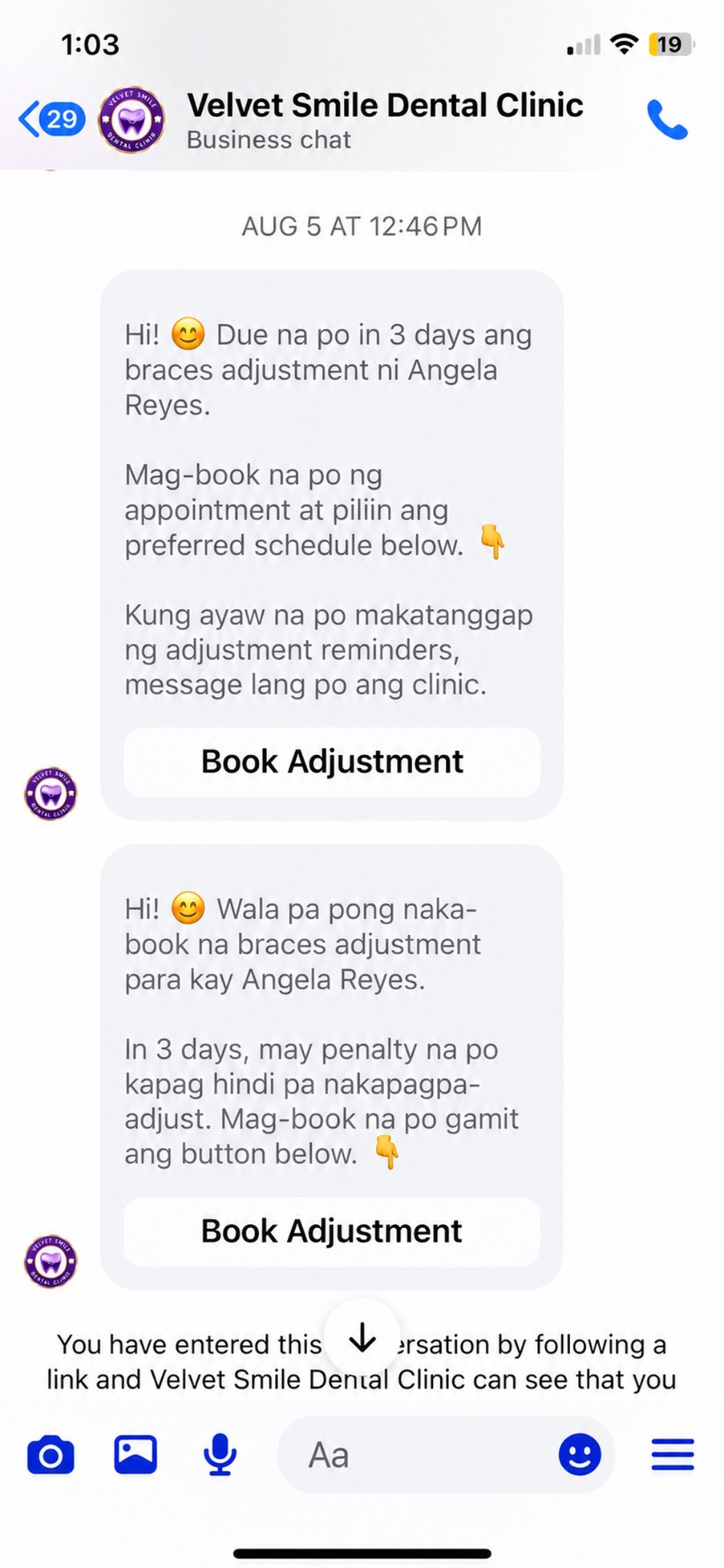
No app to learn. DentiBuddy reminds patients in Messenger before their adjustment is due, with a link to book. If they have not booked, follow-ups help bring them back to your schedule.

1

Before the adjustment

The patient receives a Messenger reminder with a booking link.

2

If they have not booked

DentiBuddy follows up automatically.

3

When they book online

The follow-ups stop, and the appointment is confirmed.

Two real braces adjustment reminders sent by Velvet Smile Dental Clinic in Messenger
Actual Messenger reminders from Velvet Smile Dental Clinic.

Optional policy noticeStill unbooked? The follow-up can include your clinic's missed-adjustment policy. No penalty policy? The patient simply gets a plain follow-up.

Dr. Phoebe Tolentino of Velvet Smile Dental Clinic

Built with a real clinic

15/15

First self-booked patients showed up.

“Yung mga ready talaga, sila na mismo yung nagse-self-book. Sa first fifteen patients na nag-self-book, lahat sila tumuloy sa appointment.”

Dr. Phoebe Tolentino, DMDVelvet Smile Dental Clinic · Cabuyao, Laguna

What's my part?

Less than you think.

Follow the guided steps to connect your clinic's Facebook Page, set your adjustment interval, and test the reminder. Patients scan your clinic QR code to register themselves.

  • No new app for patients
  • No technical skills needed
  • Clear, guided setup and testing
Arjelyn Nebalasca, founder of DentiBuddy

Founder note

Hi, I'm Arjelyn.

DentiBuddy started in my best friend's dental clinic in Laguna. Braces follow-ups meant checking a paper calendar covered in erasures and messaging patients one by one.

On busy days, some follow-ups were forgotten. Patients came back late, and the clinic had to rearrange the schedule again.

I want to help other clinic owners get that time back, with fewer patients to chase, fewer schedules to fix, and more energy for the people in the chair.

Waitlist + free trial

Join now. Try it free when your clinic is ready.

DentiBuddy is still being finished. Joining the waitlist gives your clinic a place for future activation, with no payment today.

  1. 1
    Join the waitlist

    Tell us about your clinic.

  2. 2
    We'll contact you when your trial is ready

    Follow the guided steps to connect your clinic and test a reminder.

  3. 3
    Try it free for 30 days

    Use it with real patients, then continue only if it works for you.

Your trial begins after activation

30 daysFREE

Then ₱1,499/month if you choose to continue.

  • No payment needed to join the waitlist
  • Trial starts when your clinic is activated
  • No charge if you do not continue after the trial

Joining the waitlist does not start your 30-day trial.

Questions clinic owners ask

Before you join the waitlist

When does this actually open?

DentiBuddy opens to a small first group of clinics later this year.

Does the free trial start when I join the waitlist?

No. Joining the waitlist is free and does not start your trial. Your 30-day free trial begins only after DentiBuddy is set up and activated for your clinic.

What if the patient doesn't book?

DentiBuddy checks for an online booking and continues to follow up for a limited time while the patient remains unbooked. A confirmed online booking stops the follow-ups. A missed-adjustment policy notice is included only if your clinic uses one.

Do I have to encode every patient?

No. The patient scans your clinic's QR code and enters their name and email in Messenger. You only need to display or send the QR code.

What if the patient books another way?

DentiBuddy automatically detects bookings made through its online booking link. If a patient books by phone, walk-in, or staff message, your clinic needs to track that appointment separately. It will not automatically update the patient's reminder cycle. The patient does not need to scan the QR code again.

Can we change the reminder schedule, and does it sync with our calendar?

Yes. The reminder timing can follow your clinic's adjustment interval and can be updated when needed. Confirmed online bookings sync with Google Calendar.

Do patients need to install anything, and can they stop the reminders?

No new app is needed. Registration, reminders, and the booking link work through Messenger. Patients can ask the clinic to stop their reminders anytime.

What access do you need, and how is patient information used?

During guided setup, connect your Facebook account, approve the requested permissions, and choose your clinic's Facebook Page. Your clinic keeps ownership and control of the Page. Patient information is used only for your clinic's reminders and appointment communication. It is not sold, used for unrelated marketing, or shared with other clinics.

Can we customize the reminder messages or use another language?

Yes. You can request wording that fits your clinic in Filipino, Bisaya, English, or another language. Tell us what you'd like the messages to say, and we'll review what can be supported before they go live.

Braces reminders without the manual follow-up

Join free now. Try DentiBuddy after activation.

No payment needed. Your 30-day free trial starts only when your clinic is activated.